

What engineering makes this “near-perfect autocomplete” capable of:
- Text-to-SQL (Analytics): Converting natural language questions into database queries to filter dashboards or execute ad-hoc analysis.
- RAG (Retrieval-Augmented Generation): Answering precise questions using an enterprise’s private knowledge base without hallucinating.
- Sentiment Analysis: Classifying emotions, topics, or intent from Google Maps, Yelp, or free-text customer reviews.
- Extraction: Automatically structuring messy conversation records into clean forms or JSON data.
- Coding Copilots: Assisting developers by writing code snippets, refactoring functions, and designing user interfaces.
- Mathematical Reasoning: Proving theorems or solving complex logic puzzles.
- Predictive Health: Identifying potential health issues from patient data patterns.
- Drug Discovery: Filtering medicine candidates to accelerate research in fields like cancer treatment.
The key idea is that even though the model isn’t “trying” to solve a problem intentionally,
- Prompting acts as an instruction constraint. We force the model to solve a given task, adopt a specific persona, tone, or format, narrowing down the infinite universe of potential next tokens to only those that fit the task at hand.
- RAG (Retrieval) acts as a knowledge constraint. We force the model to predict answers based on specific documents we provide, effectively extending its static training data with up-to-date, company-specific knowledge.
- Tools & Functions act as action constraints. We limit the model’s output to specific formats that trigger code or API calls (soon explained). This naturally extends the model’s capabilities, allowing it to hand off complex tasks-like running a specialized sales forecast engine-that it couldn’t reliably compute on its own.
- Temperature acts as a creativity constraint. We tune the randomness up or down to make the model either strictly deterministic or highly creative.
You might ask: Why not just fine-tune a model on my specific data for each task? The answer is cost and flexibility. For the price of constantly retraining a small model for every single use case, you can leverage a significantly larger, general-purpose LLM. By wrapping it in the right engineering-adding tool usage, smart prompting strategies, or lightweight fine-tuning-it can solve much more complex problems out of the box. Of course, for highly specialized or heavily regulated edge cases, training your own LLM from scratch remains the right path.
From Token Prediction to Simple Chatbots
Modern transformers are already fine-tuned to handle conversational formats (taking chat history and outputting the next sentence), so we rarely have to manually “trick” them into chatting anymore. However, looking at a raw completion prompt perfectly illustrates how we use prompting as a constraint to steer the next token prediction in the right direction. To force a base LLM to act as a chatbot, we would send a prompt like this:
"""
You are 'Bepo bot', an intelligent customer service assistant of the Best Phone Mobile and Broadband Internet Provider, specialized for consumer mobile help desk. [...] You are getting a question related to Best Phone Mobile services, and you have to answer it in a short and understandable way at the same language that the question was asked.You had the following chat history:
- User: Hi, can I ask a question?
- You: Good afternoon, I am Bepo bot, your digital assistant, feel free to ask any question related to Best Phone Mobile’s services.
- User: Great. How can I change my PIN code?
Some related content is the following, answer the question solely on this content: [retrieved knowledge base text]
Remember, answer in a brief but understandable way.
Your polite answer is: """
When the LLM processes this text, its job is simply to predict the next token. It will likely output the word “Thanks “. But the model stops there.
As this example shows, the LLM itself is completely stateless. It has no memory of the conversation once it finishes predicting a token. (Note: This is changing slightly with newer hybrid Mamba-Transformer architectures, a topic for a later blog post!) Because the model forgets everything instantly, the application engine must continuously feed the entire chat history and all previously generated tokens back into the model just to get the very next token. This loop finishes only when the LLM generates a special “stop token,” signaling it has finished its thought. So, the chatbot seems to have memory, but only because the application is constantly reminding it of everything that has been said up to that moment.
There is one more critical detail: even if you feed the exact same input text into the model multiple times, the final answer might be different. This happens because the LLM doesn’t just pick the one correct next token; it calculates a probability distribution for all possible next tokens and then randomly selects one of the most likely candidates. We control this randomness with a parameter called temperature.
If the temperature is set near 0, the model becomes highly deterministic, almost always picking the most probable token. If it’s set closer to 1 (or higher), the variance increases, allowing the model to pick less obvious words. For rigid corporate chatbots, a temperature near 0 works best to ensure consistent answers. For creative writing or brainstorming, higher values are preferred.
If a higher temperature causes the model to pick a slightly different first word, that new word becomes part of the input context for the second word. A single different token alters the context for the rest of the generation, sending the text down a completely different branching path. The longer the generated answer is, the higher the chances of these diverging “splits” happening, resulting in wildly different final responses from the exact same starting prompt.
Calling LLMs from Your Application: The API Layer
Most people interact with Large Language Models through consumer web apps like ChatGPT, Gemini, or Claude. But
Every LLM provider (like OpenAI or Anthropic) has its own specific API rules and formats. However, the ecosystem has evolved quickly to make this easier:
- Orchestration Frameworks: Libraries like LiteLLM, LangChain, and LlamaIndex act as universal translators. They allow you to write your code once and route it to almost any provider (OpenAI, Anthropic, AWS Bedrock) using the exact same format.
- Local Hosting: If you prefer to download open-source models (e.g., from HuggingFace) and run them on your own servers or laptop for privacy and cost control, tools like Ollama and vLLM provide similar API endpoints for your local hardware.
During inference (the technical term for generating text with a trained model), modern APIs structure the conversation using specific roles. Instead of sending one giant block of text, we break the input down into a list of messages. Using our “Bepo bot” scenario from the previous chapter, an API call using Python and the OpenAI library would look like this:
import openai

# Initialize the API client
client = openai.OpenAI(api_key="YOUR_API_KEY")

response = client.chat.completions.create(
    model="gpt-4o", # or any other model you choose
    temperature=0.2, # Keeping it low for a corporate bot
    messages=[
        {
            "role": "system",
            "content": "You are 'Bepo bot', an intelligent customer service assistant for Best Phone Mobile. Answer questions in a short, understandable way in the user's language. Use the following related content to answer solely based on it: [retrieved knowledge base text]"
        },
        {
            "role": "user",
            "content": "Hi, can I ask a question?"
        },
        {
            "role": "assistant",
            "content": "Good afternoon, I am Bepo bot, your digital assistant, feel free to ask any question related to Best Phone Mobile's services."
        },
        {
            "role": "user",
            "content": "Great. How can I change my PIN code?"
        }
    ]
)

print(response.choices[0].message.content)
The System message holds the instructions that don’t change: the bot’s personality, its constraints, and the retrieved context it needs to answer the question. The User messages are the human’s inputs, and the Assistant messages are the bot’s past replies. Modern LLMs are specifically trained to read this structured format and output the next “Assistant” response.
The Basic Chatbot Architecture (Slightly Technical)
The next few lines are more implementation-focused, so feel free to skip if you just want the high-level story. A typical chatbot-based application looks like this:
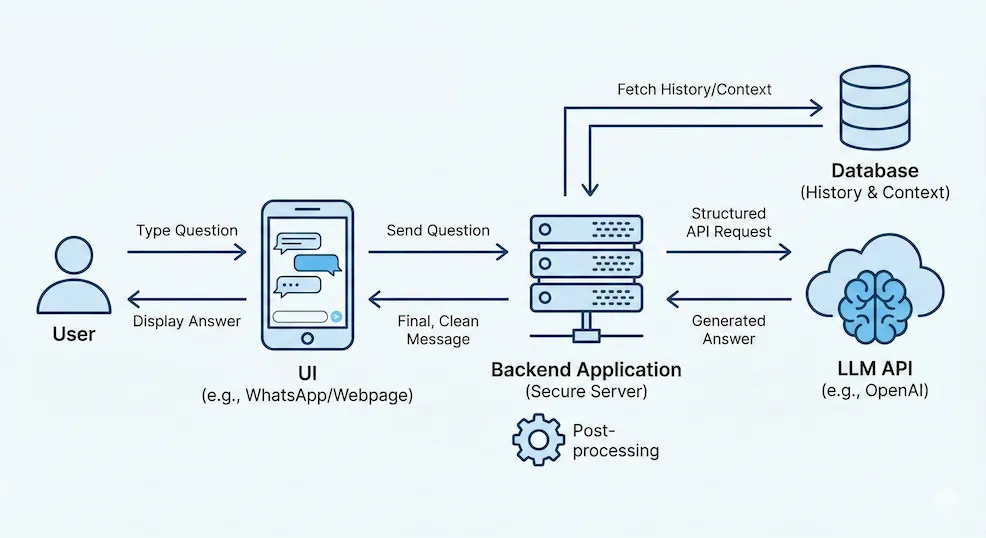
Figure 1: The Basic Chatbot Architecture
As you can see, the UI (the webpage or WhatsApp interface you are using) doesn’t talk to the LLM directly. Instead, it sends the user’s recent question to your backend application, which is running on a secure server. In addition to calling the LLM to answer the question (sometimes multiple times, as we’ll detail later), the backend fetches the conversation history from a database, grabs any necessary context, formats everything into the structured API message we saw above, and fires off the request. Once it receives the LLM’s generated answer, it processes the text and sends the final, clean message back to the UI.
From Documents to Answers: How RAG Chatbots Work
Base LLMs have two significant limitations: they are frozen in time, and they are only trained on publicly available datasets. If you ask an LLM about your company’s latest internal policies, a private customer record, or a product you launched yesterday, it will either tell you it doesn’t know, or worse, it will simply predict a plausible-sounding, fabricated sequence (a hallucination).
You could continuously fine-tune the model on your latest data, but that is extremely expensive and time-consuming. The simplest solution is
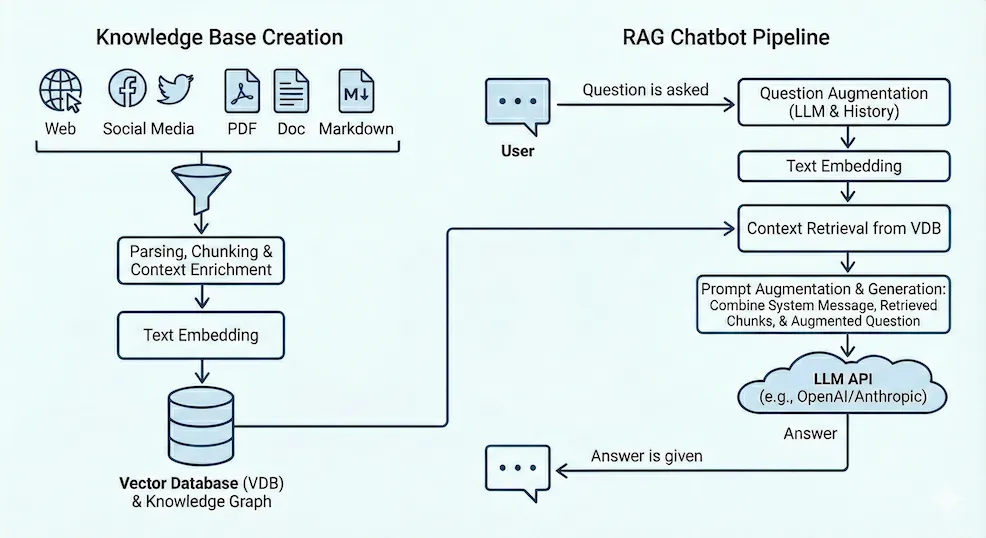
Figure 2: RAG Chatbot Architecture
To build a chatbot that provides accurate information (with lower risk of hallucination), you first need to build a Knowledge Base. You collect all relevant HTML, PDF, Word, and Markdown files containing your up-to-date data. Then, you process this data for the AI:
- Creating “Chunks”: If you try to paste massive, 100-page manuals into the API call, it becomes incredibly slow and expensive because the LLM has to process thousands of irrelevant words to generate its output. Furthermore, you often need to combine answers from different documents. To solve this, we break documents down into smaller chunks (usually 300 to 500 words long) so the LLM only reads the exact paragraphs it needs.
- Context-Enriched Chunking: If you just slice text blindly, a chunk might lose its meaning. For example, a chunk might just contain a table of prices - but without the page title, the AI doesn’t know if these are prices for Japanese roaming or domestic broadband. Therefore, best practice involves automatically appending contextual information (like document titles and section headers) to the text of each chunk before saving it.
- Embeddings and Vector Stores: To actually find the right chunk out of thousands, we convert the text of each chunk into a mathematical representation called an embedding. You can imagine this as an arrow pointing to a specific coordinate in space. Only, instead of 3D space, we use a space with 1,000 to 3,000 dimensions. If two pieces of text mean similar things, their arrows will point to the exact same neighborhood. If they are unrelated, they point far away. (I’ll be writing a separate post entirely on how embeddings work!) We load all these chunk vectors into a Vector Database (VDB).
Once your vector knowledge base is ready, the actual chatbot application follows a similar pipeline every time a user sends a message:
- Question Augmentation: If the user previously asked about Japanese roaming, their next question might just be, “How much does it cost?” As a first step, the backend makes a quick, cheap LLM call to rewrite the question using the chat history: “How much does the 3GB 5G Japanese roaming package cost for a week?”
- Retrieval: The backend converts this augmented question into a vector and searches the VDB for the closest matching arrows. The database returns the 5-10 most relevant text chunks (e.g., the exact pricing tables for Japan).
- Prompt Augmentation & Generation: As we saw in the API chapter, the backend builds the final prompt. It combines the System Message (the bot’s personality), the retrieved chunks (the freshest context), and the user’s augmented question (or the chat history), then asks the LLM to generate the final answer.
Guardrails (Optional): In enterprise systems, we might add some further steps to review the answer, calculate a confidence score, or apply security guardrails to ensure the bot didn’t say anything inappropriate before showing it to the user.
From Code Assist to Tool Use: The First Steps Toward Agents
Code is just text with a strict grammar. In a standard software script,
Since our LLM can write code, we can modify our RAG chatbot to perform automated analytics. Let’s assume we have a movie database and want to build a “talk to your data” bot. If a user asks, “Show me a bar chart of the 10 most-watched Julia Roberts movies,” the bot should automatically query the database and render a chart.
The Naive Approach: Raw Text-to-SQL
As a baseline solution, we could use our prompt to ask the bot to generate raw SQL code instead of a conversational answer. The backend application would take that SQL, run it directly against the database, put the resulting data into a Markdown table, and finally call the LLM one last time to summarize the results.
While this helps us understand the concept, there are severe issues with this approach. Generating raw code and executing it directly is highly unreliable and opens the door to massive security risks like prompt injection and hacking (which I covered in my previous post).
The Advanced Approach: Function Calling
If we want to do this safely, we don’t let the LLM write raw, arbitrary code. Instead, we define strict, safe functions in our backend - such as filter_table(rows, columns), aggregate_data(), or draw_chart(). We can also create “intelligent” functions, like a tool that takes a movie title and uses an LLM to pull all semantically similar titles from a database column (a mechanic I’ll cover in an upcoming post).
Once these safe functions are defined, we apply an action constraint.
Technically, we force the LLM to output a list of JSON dictionaries. For example, it might predict the next tokens to look like this:
[{"function": "filter", "parameters": {"fieldname": "year", "mode": ">=", "value": "2025"}}, ...]With this setup, the LLM first calls a “database description” tool to get a hint about the available tables and their fields. Next, it calls the filter tool, and finally, the charting tool. When you give an LLM predefined tools and train it to plan out how to use them, you have built an Agent.
The Self-Correction and Learning Loop
Code and tool parameters do not always work perfectly on the first try. If the LLM’s chosen parameters throw an error, we don’t crash the app (since the code is running in a well-supervised environment). Instead, we feed the original prompt, the LLM’s attempted tool call, and the resulting error message right back into the LLM as a new prompt. We essentially ask it: “That didn’t work pal, here is the error, please try again.” In most cases, the LLM will successfully correct its own parameters without any human intervention after a few iterations.
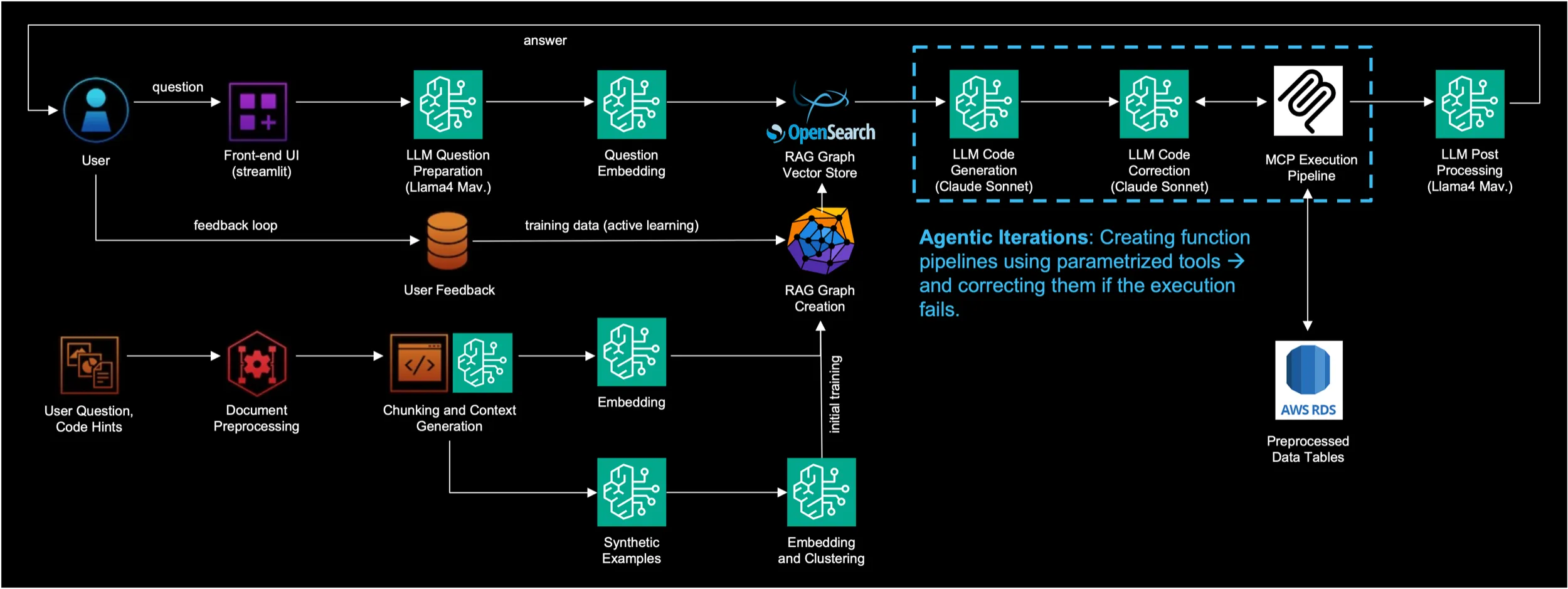
Figure 3: The Self-Correction Loop of Talk to Your Data Solutions in AWS
To make this system even smarter over time, we can use RAG to inject examples alongside our context. This is especially important for tasks that are complex but asked frequently.
If We Can Call Functions, We Can Do Anything: The Rise of Agents
In the previous section, we told the LLM to output a fixed list of functions in a fixed order. But what if the model doesn’t even know what tables or columns exist in the database yet? In that case, it needs to examine the results of the first function before generating the parameters for the second function.
The Reasoning-Acting (ReAct) loop looks something like this:
- Reason: “I need to query the database, but to do that, I first need to know the table names and structures.”
- Act: It calls the “database description” tool.
- Observe: The backend runs the tool and pastes the database schema back into the prompt.
- Reason: “Okay, the table is called ‘movies’, and the relevant fields are year, title, and actor. Now I can filter it and draw a chart. No more discovery is necessary.”
- Act: It calls the “filter”, “aggregation”, and “charting” tools in sequence with the correct parameters.
Notice that we don’t even need a separate, hardcoded error-handling loop anymore. If a tool fails, the error message simply becomes the next “Observation,” and the LLM reasons about how to fix it on the next turn. Furthermore, using our RAG memory, we can save these interim results. If we save the discovered database structure to our Vector DB, the agent will only need a single LLM call to answer a similar question next time.
Standardizing Tools
Querying databases is just the beginning.
To make this scale, the
However, if you have an enterprise system with thousands of available tools, you can’t paste thousands of user guides into the LLM’s prompt-it would be too slow and expensive. The solution? Tool RAG. We ask the agent to describe what kind of tool it needs, search our vector database for matching MCP summaries, and only inject the relevant tool guides into the prompt. We can also create specialized “Expert Agents” (e.g., a Legal Agent or an HR Agent) that only have access to the specific tools relevant to their discipline.
Real-World Complexity: A2A and Human-in-the-Loop
Many of these tools aren’t just running local Python code; they are calling external APIs (like committing code to GitHub or sending a Slack message). Sometimes, a complex task might take days to execute, requiring your agent to cooperate with other agents running on entirely different servers.
For these massive workflows, developers use A2A (Agent-to-Agent) communication standards. Building these systems gets incredibly complex. You have to engineer solutions for timeouts (what if the other agent doesn’t answer for an hour?), infinite error loops, and automated testing.
- The human expert can observe the agents’ reasoning logs in real-time and intervene if they go off track.
- The main routing agent is programmed to pause and ask the human for advice if a requirement is unclear.
While 100% automation isn’t quite here for solving complex problems (from software engineering to drug discovery), this collaborative approach offers a massive speed increase.
Why Predefined Tools?
You might wonder: Why go through the trouble of building tools? Why not just let the LLM write its own code to solve the problem from scratch every time? Beyond the severe security risks mentioned earlier, the reality is that
(One additional note: For highly specific enterprise workflows, it is often worth fine-tuning the LLM directly so it becomes an expert at calling your specific tools or selecting the best path for a complex problem. We will touch on this in the next sections, with a deeper dive in a future blog post.)
Thinking as Searching: Forcing Autocomplete to Reason
If we face a very hard problem, we rarely solve it on the first try. Instead, we take small steps toward the goal, or we explore several parallel paths, hoping one of them leads to a breakthrough. We can engineer our LLMs to do exactly the same thing.
The
Internalizing the Search: DeepSeek-R1 and RL
Recently, models like DeepSeek-R1 took this a step further. Instead of relying on the user to prompt a Chain of Thought, they
Tree of Thoughts (ToT): When Problems Get Really Hard
CoT is great, but it still struggles with highly complex, branching problems - like proving advanced mathematical theorems. In these cases, we upgrade from a single chain to a
- Thought Generator: We ask the LLM to propose a few different ideas or steps that might bring us closer to the solution. Each idea creates a new “state” or branch.
- Value Network (Critic): We ask the LLM (or a separate, specialized model) to evaluate these new states. It scores how probable it is that we can actually solve the problem from this new position.
- Underlying Search Engine: A backend script manages the whole process. It asks the Generator for steps, asks the Critic to score them, and then decides which branch to explore next. Most often, developers use Best-First Search, which always explores the state with the highest score, even if that means abandoning the current path and jumping two steps backward to a better branch.
This search methodology is highly utilized in mathematics. Theorems can be formalized into code, and we can use an “oracle”: a deterministic software environment that takes your current starting state and a proposed logical step, strictly validates the math, and calculates exactly what your new state will be. One of the most popular formalization languages for this is Lean 4, which has a rapidly growing community.
In this setup, the LLM suggests a few logical steps (the Thought Generator). Lean 4 acts as the Oracle: it applies these steps to the current problem and, if valid, outputs the new states (the remaining sub-goals left to prove after each suggested step). A Value Network then scores all these new states so the search engine knows which path is the most promising to explore next. The engine keeps navigating these branches until Lean 4 returns an empty state, confirming the theorem is definitively proven.
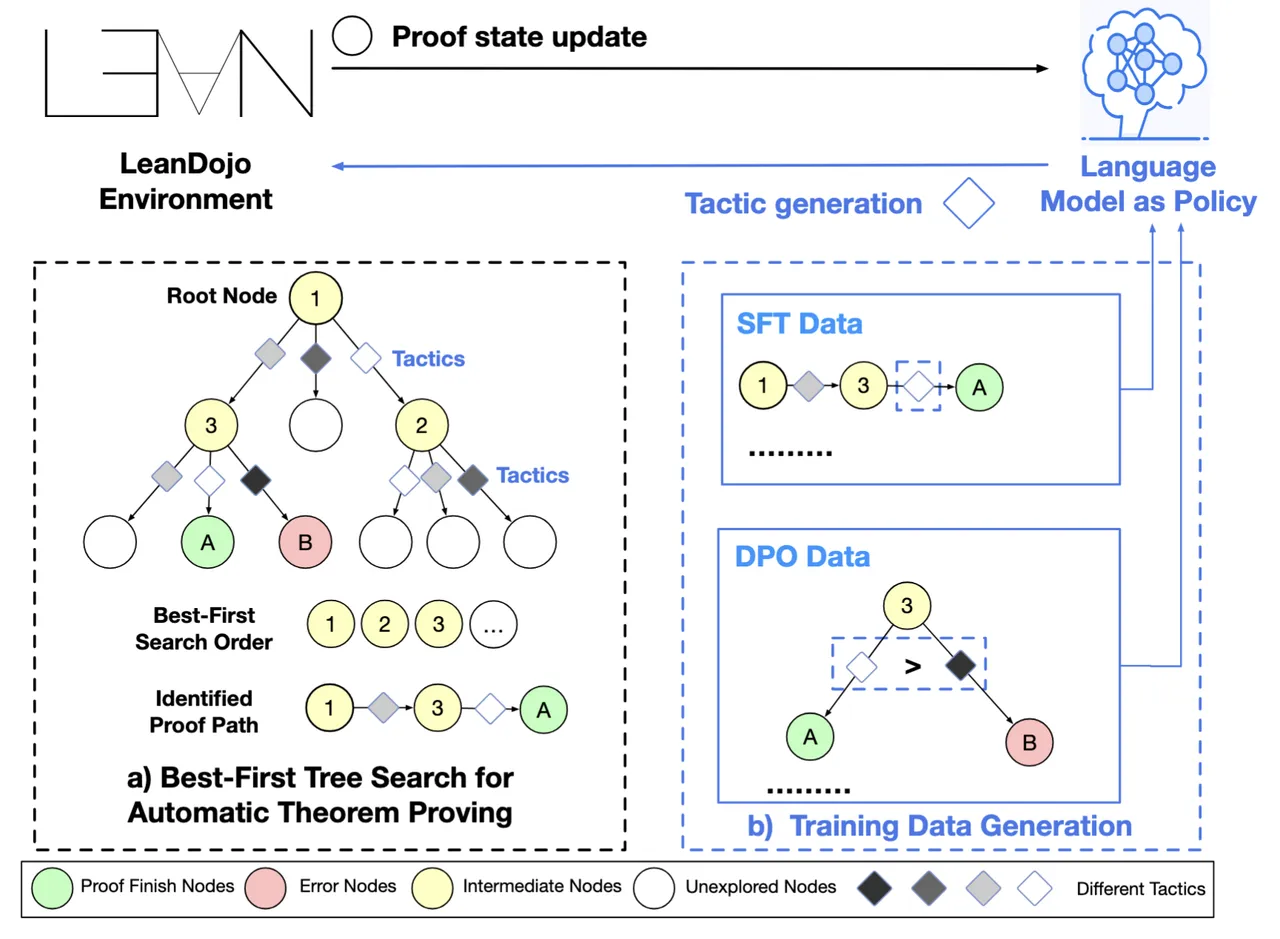
Figure 4: Theorem Proving Using Best First Search
These search methods can be computationally expensive, as we might generate thousands of discarded tokens to find one correct path. However, there are several ways to narrow the search path. Reinforcement learning can be used to train the Critic to evaluate paths faster and more accurately (in some setups we can even train the whole system). Furthermore, we can bring back our old friend, RAG. If we encounter a new math problem, we can search our Vector DB for the step-by-step proofs of similar problems we solved in the past, injecting them into the prompt to give the search engine a massive head start. (I will be dedicating a full blog post to optimizing these search paths in the near future.)
Broadening the Languages for Predicting Health and Beyond
We have seen that LLMs can learn human languages and programming code. Using the exact same logic, they can also predict your next health issue. A patient’s medical history is simply a chronological sequence of events. If we treat every doctor visit, diagnosis, lab result, or prescribed treatment as a “token,” we can train a transformer on billions of these sequences. For example, recent foundation models like the Cosmos Medical Event Transformer (CoMET) were trained on over 115 billion discrete medical events from de-identified health records.
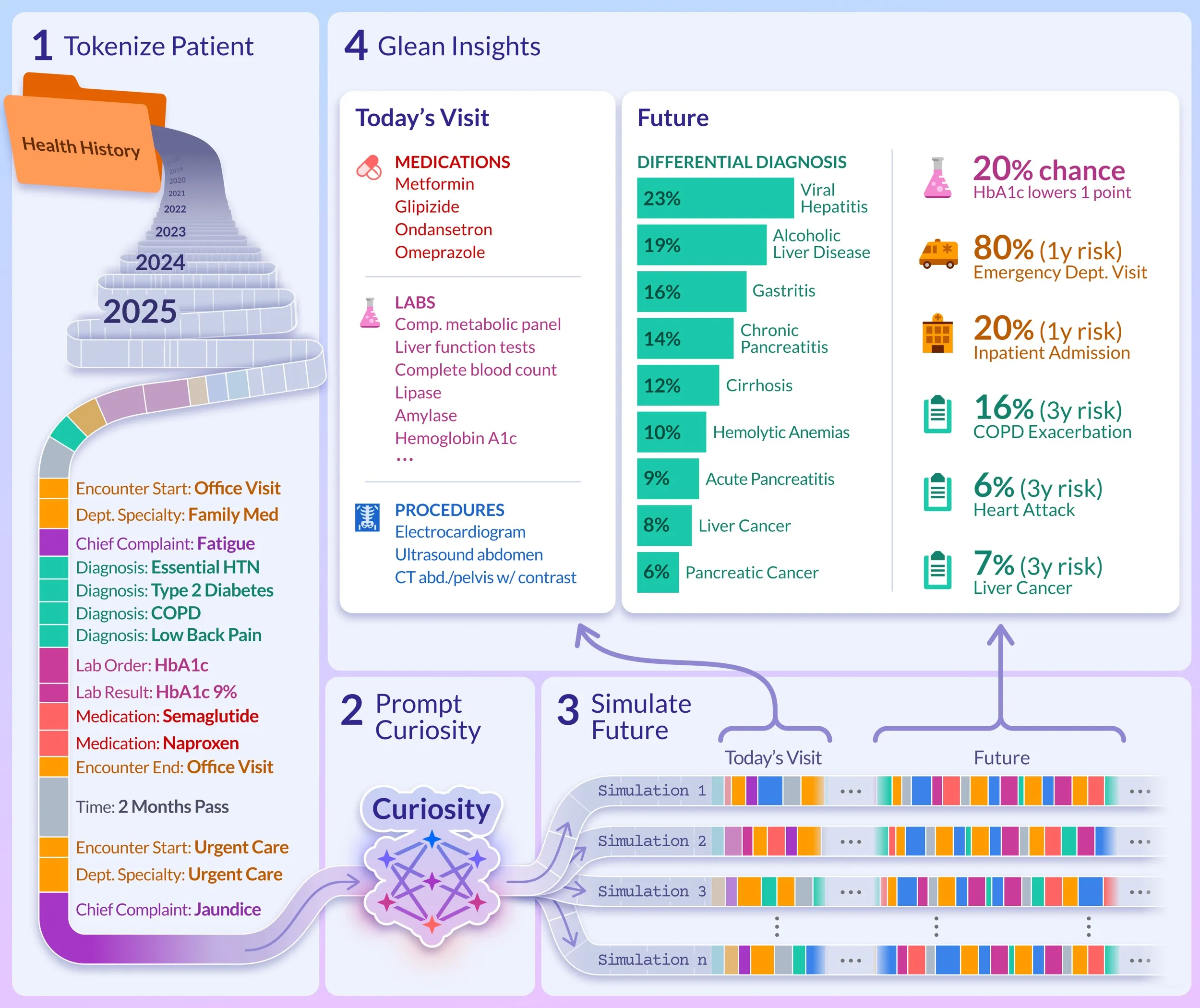
Figure 5: Cosmos Medical Event Transformer in Use
If a transformer (the underlying machine learning solution of LLMs) can learn English, Python, and medical histories, it can learn any sequence. It can learn the “language” of cell tower logs, analyzing sequential binary data to predict critical network meltdowns before they happen. It can learn the language of amino acids, allowing models to predict complex 3D protein structures or generate entirely novel molecules, drastically accelerating drug discovery and cancer research.
In this blog post, we traced a logical path from simple chatbots to complex, agentic theorem proving. But every stepping stone we discussed unlocks thousands of everyday applications.
And yet, all of this - from writing SQL to discovering drugs - is achieved through the exact same mechanism: predicting the most mathematically probable next token.
This brings up a fascinating debate: are we actually building “Artificial Intelligence,” or is this just extremely sophisticated Statistical Pattern Matching? When an AI agent generates a brilliant, multi-step solution using a Tree of Thoughts, is there any real comprehension behind it, or is it just the ultimate autocomplete?
In upcoming posts, we will dive deeper into the fundamental building blocks of these models, explore how their “reasoning” differs from true human cognition, and look at what the next big evolutionary leaps in AI will actually entail.
Don’t want to miss the next post?
Resources
[1]: NVIDIA Nemotron 3: https://developer.nvidia.com/blog/inside-nvidia-nemotron-3-techniques-tools-and-data-that-make-it-efficient-and-accurate/
[2]: OpenAI API: https://developers.openai.com/api/docs/
[3]: Model Context Protocol (Anthropic): https://www.anthropic.com/news/model-context-protocol
[4]: Model Context Protocol (Wikipedia): https://en.wikipedia.org/wiki/Model_Context_Protocol
[5]: ReAct Agents: https://arxiv.org/abs/2210.03629
[6]: Chain of Thoughts: https://arxiv.org/abs/2201.11903
[7]: Tree of Thoughts: https://arxiv.org/abs/2305.10601
[8]: DeepSeek-R1 and GRPO: https://arxiv.org/abs/2501.12948
[9]: Theorem Proving: https://seed.bytedance.com/en/blog/seed-research-new-sota-in-formal-mathematical-reasoning-bfs-prover-model-now-open-sourced
[10]: CoMET Health Prediction: https://arxiv.org/abs/2508.12104