Mind the Orchestrator: Agentic Apps That Let Your Business Shine Instead of Eating Your Resources
Most GenAI pilots fail before they matter. Beat the odds: pick the right tasks to automate, demand the right app builder, and ship apps that get better with every conversation.
The New York Times was willing to cannibalize its profitable print business to pioneer a digital subscription model [1]. They had realized they weren’t in the “paper” business but in the “trust and curation” business. Netflix disrupted its own successful DVD-by-mail service to build a streaming empire before the market could do it for them [2].
Every technology shift hands businesses a moment like this. Neither of these companies merely automated its old business - both recognized what the new technology made scalable. Newspapers and DVDs could only travel so far; the internet carried the same content everywhere.
AI’s new offer is scalable capacity for work itself: suddenly you have something close to infinite employees, and every company has to decide where to point them. Some firms start with automation - freeing up money and people - but all the successful ones continue with new services that win customers from competitors.
For most businesses, the practical form is agentic apps: the business knowledge you already have, turned into tools, orchestrated by an agent. No wonder the platforms for building them seem to appear daily.
The practice is less shiny: Gartner expects more than 40% of agentic AI projects to be canceled by the end of 2027 [3], and MIT found that about 95% of GenAI pilots produce no measurable P&L impact [4]. Pilots fail on many things - the wrong use case, a lazy rollout - but one choice caps them all: the orchestrator sets the quality ceiling of every app you build on it.
I wrote this article to explain what matters when you select - or patch together - an agentic app builder platform for your company - and, just as important, how to pick the right use cases and how to introduce the apps so they learn from usage. The goal: automation and new services that free your resources instead of eating them.
What’s Inside an Agentic App? (A Quick Refresher)
An intelligent agent (as you can read in an earlier post) can call tools to solve a complex problem. Give it access to an IMDb query, a web search, a scraper, a calculator, and a few parser tools, and it can answer questions like “How much did Julia Roberts earn in her last 20 movies?”. It will probably do the following:
Call the IMDb query tool to find the titles of her last 20 movies.
Call the web-search tool to find the salary for each title.
Call the scraper tool to download the pages it found.
Call a reader tool to parse the amounts.
Call the calculator tool to sum the total.
Deliver the final, synthesized answer.
When we want more control over how a problem gets solved, we write agentic apps. In an automated debt-collection call, for instance, the agent must open with an introduction, verify the person it is speaking with, and share any details only after that. It must follow a strict negotiation protocol, and end the call with an agreement the client has signed off on. We cannot leave all this to the agent’s judgment - that would risk sharing sensitive information with an unauthorized (or simply wrong) person, or accepting a deal we shouldn’t accept. But we still need the agent’s intelligence to fill the inputs of the tools involved (verification, negotiation, agreement) from the borrower’s answers.
The ReAct (Reasoning + Act) Loop
A ReAct agent doesn’t answer in one shot. It runs a loop: reason, call a tool, observe, repeat - until the answer is well-grounded or it hits a step limit. The difference from a hard-coded “search → read → summarize” pipeline shows up at the first surprise: an empty search result means “broaden the search,” not “return nothing.” The plan refreshes after every observation, and that adaptivity is the whole point.
The tools are trusted functions with a user guide, so the agent can read how to parameterize each one and in which circumstances it may be used.
Other Components of Simple Agentic Applications
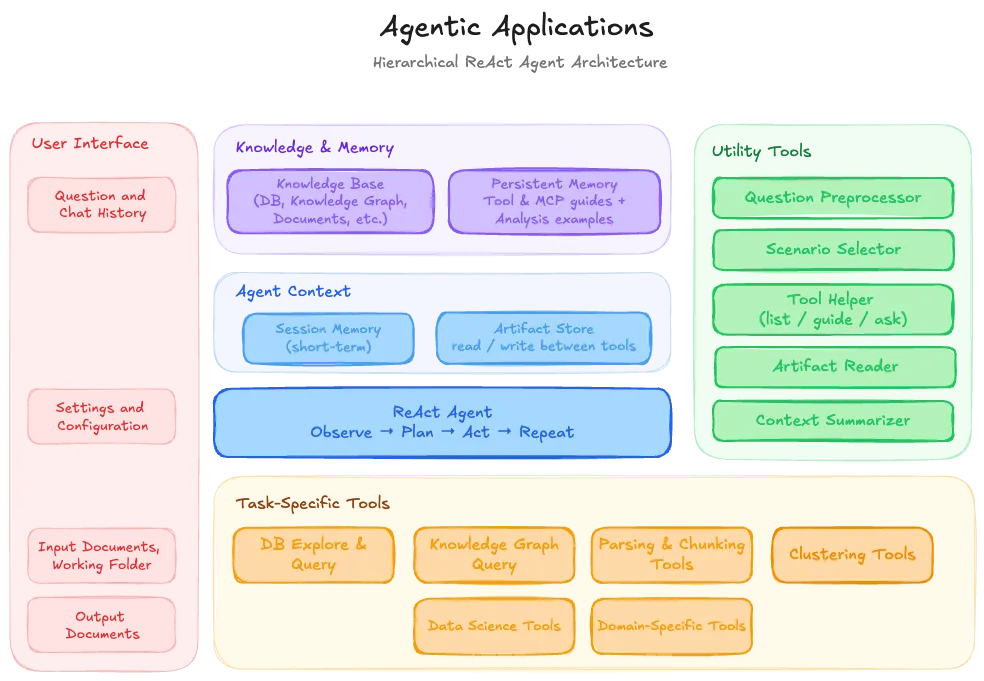
The chart below shows a typical ReAct-based agentic application.
Figure 1: ReAct-based Agentic Applications.
diagram by Marton
When the user asks a question, a question preprocessor activates first: it rewrites the question to be self-contained. In some cases it also extracts keywords and terms. And since most apps are written in English - with the examples and guides stored in English - a question arriving in another language is best translated first, so the retrieval of data and examples stays accurate.
As mentioned earlier, agentic applications often have states: in debt collection, there are greeting, identification, negotiation, and agreement states, among others. Each state has a different playbook, with its own rules and available tools. Finding the right scenario and state is the job of a question router that follows the augmentation step - usually it’s an additional output of the same augmentation call, though with many scenarios and states it can be a nearest-embedding search over example sentences.
Besides the question and the state, the agent needs a working memory (session memory, or short-term memory): the conversation history, the tool-call logs, the location of intermediate results, and any reasoning worth reusing in later turns. It is usually paired with an artifact store - a shared workspace where tools pass large objects to each other by name (a parsed 100-page contract, a query result with a million rows, a rendered PDF report) instead of stuffing them into the prompt.
The persistent memory (long-term memory) holds how to do things: detailed tool guides and example pathways - step-by-step procedures for typical tasks. These are retrieved on demand, based on the augmented question. Beyond the persistent memory, external knowledge bases or databases are often connected to the agent. To handle them well and retrieve the right information, the ontology of the external database (with some rules and examples) should also live in persistent memory. (The data itself usually cannot: it belongs under access management, and storing it there would be inefficient anyway.)
With all this loaded into the context window, the agent can start planning. If many tools are available, a tool-helper utility can preselect the right ones and suggest how to parameterize them.
After many turns, the short-term memory swells. A context summarizer keeps it in shape: it drops the outdated details and condenses what matters. Occasionally copying an item into the user’s memory, or flagging it for promotion into the persistent one.
Even from this simplified tour, one thing is clear: the orchestrator’s design matters just as much as the LLM itself. Before detailing how to select a good one, let’s see why we build agentic apps at all, instead of having custom code written (by a coding agent) for every task we face.
Agentic Apps Over Custom Code
Coding agents can develop a custom app in one shot - yet agentic apps have become the common choice for automation. The main reasons are cost efficiency and reliability. Tools now have a universal format, the Model Context Protocol (MCP) [5], so thousands of well-tested tools for the common tasks can be used and reused. In practice, you LEGO your application together from ready-made components; “someone has already built this tool” is the default assumption. And a tool sharpened by several applications approaches perfection: every reuse lowers the probability of errors.
Often the result doesn’t even need an agent: many automations end up as a deterministic workflow of tools, sometimes with an intelligent component inside. Agentic applications earn their keep only where decisions are needed. A widely shared engineering manifesto, 12-Factor Agents [6], reached the same conclusion from the trenches: the agents that survive production are mostly well-engineered software, with the LLM doing only the parts where probabilistic reasoning helps.
What to Expect from an Agentic App Builder
Every one of your future apps inherits the selected platform’s ceiling - so choose it carefully, or design your own the right way.
Describe, generate, inspect, correct
A solution survives only if it gets used. In the era of agentic coding, no one will adopt a builder that needs days of coding (or any coding) to produce a simple application. Fortunately, the code-first app builder libraries (the ones you assemble apps from, piece by piece, like Pydantic AI or LangGraph) are well known to every agentic pair-coder.
This is the easier half: point a coding agent at the library’s source and docs, and it can build up the skills it needs for the app-building phase. The other half is visibility. If a coding agent built your app, you must be able to observe it working before and in production to find and fix the errors it may have made.
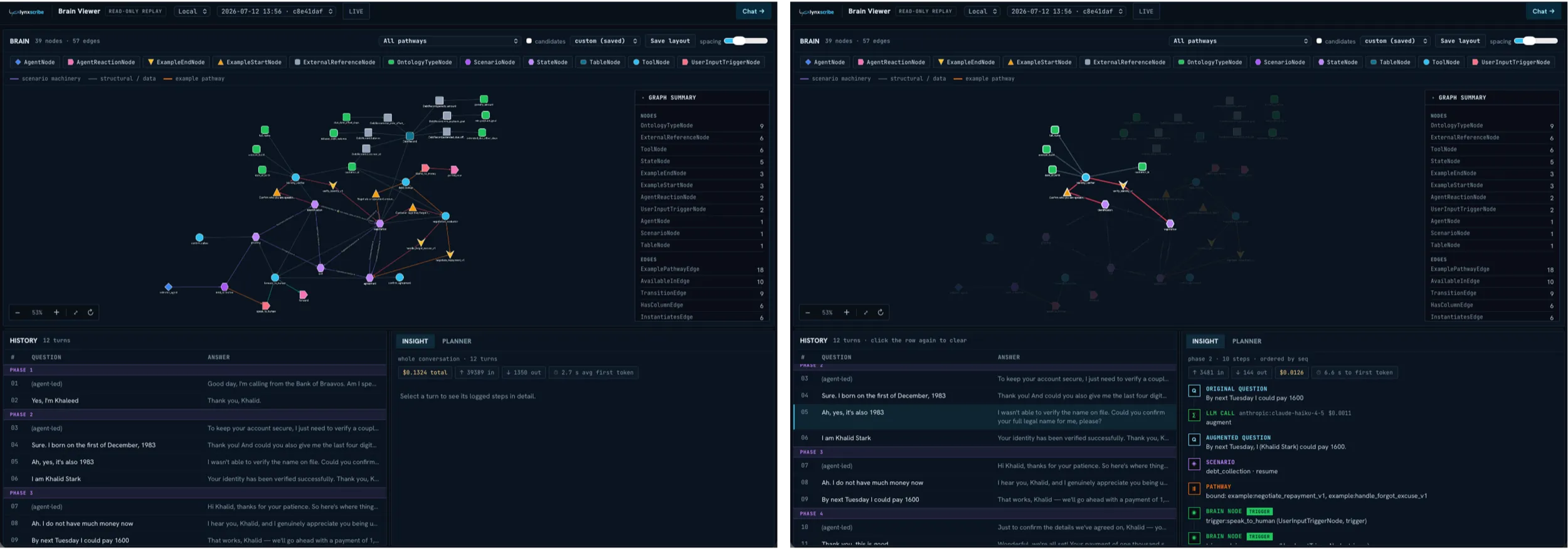
Figure 2: The Agentic App’s blueprint in LynxScribe’s brain view (with and without pathway highlight).
Lynx Analytics
The figure shows a simple agentic application’s blueprint. You can see the scenarios and states (the scenario is debt collection; the states are greeting, verification, negotiation, and so on). For each state, you can see the available tools and the rules for advancing to the next state - say, which information must be collected and verified before the negotiation phase can begin. Alongside the states and tools sit the example pathways, which show the agent a good way to move forward in a given state. Click on any line of the conversation, or follow a chat live, and you can see everything behind it: each tool’s inputs and outputs, the agent’s reasoning, the examples that were retrieved. And when you spot the cause of a bad decision or a wrong tool call, you can instruct your coding helper (say, Claude Code) on what to change in the app.
This is the describe → generate → inspect → correct loop, and it’s what lets you build and test an application quickly.
The power of learning: driving the error rate toward zero
The most important measure of an agentic (intelligent) application is how fast it masters a task - or, if it’s meant for copilot mode, how fast it becomes helpful enough that people actually use it. Most solutions need months of user-developer iterations before their results are accepted without a second look. But since most of this misbehavior can be analyzed by a capable LLM, the concept of evolving agents has risen. Unlike LLM training, evolving agents simply update the examples the LLM receives [7] in persistent or user memory, or the underlying prompts. Some go further and add small trainable components to the application that learn from usage.
Better still, before sending your application to UAT (user acceptance testing), you can simulate thousands of interactions and learn from those mistakes first.
Back to the debt-collection example: your agentic app can collect the inputs of thousands of calls, experiment with several strategies (answers to the usual excuses), and distill the best ones in a batch process - occasionally finding a better pathway than the ones we originally taught it. Strategies that even the human agents can learn from.
In most of our solutions, this learning is human-gated. Every newly distilled example can be reviewed, and only the good, compliance-aligned ones get accepted. And to make sure good examples exist at all, the difficult calls are allocated to larger models, which resolve the situation with higher probability, making the future examples better.
The economics: small models in a clever system
Even if your system is far from perfect, a clever model (a Sonnet, an Opus, a GPT-5.x) will solve most problems, as long as tool-call errors are fed back to it. But when you handle thousands of interactions daily on sensitive data (which forces you onto on-prem models), or you simply want LLMs that are 5-10x cheaper, model size becomes critical. Then your only way to maintain quality is the clever system described above, paired with the right selection of smaller models. With the right example pathways in place for every scenario, the model only has to execute simple steps, one at a time. It doesn’t need to think far ahead.
Further necessary functions
The past chapters already covered a lot of useful functions, from the state machine to the visible pathways (part of the persistent memory). A consumer-exposed or enterprise environment needs several more.
It helps if the solution supports building workflows from tools, along with tool overriding - so you don’t have to create a new tool when only the prompting differs. More generally, an agent should not care whether a capability is a local Python function, a sub-agent, a fixed multi-step workflow, or a remote service (MCP). Everything is a tool; a good agentic library hides the differences.
In the application blueprint above, we saw edges between the components. The edges between states collect information, and once everything has arrived, they trigger the transition to the next state. The edges pointing to tools collect information the same way, and once complete (and type-checked), they call the tool. This is what I call a “typed brain,” and it lowers the probability of errors considerably. (Pydantic AI’s graph library is built around a similar typed-transition philosophy [8].)
As the Breaking Bot article showed, agentic apps can be hacked in many creative ways. Using them in high-stakes or sensitive environments requires well-designed defenses, guardrails included - plus the ability to remove sensitive information from working memory across states (what identity verification needed in one state, the next state should no longer see). Going further on safety: enterprise applications should also stay compliant with AI regulations, like the EU AI Act. No app builder handles this yet. I believe it will soon be a well-appreciated feature.
We should also be able to evaluate the app’s behavior after every major development. These “automated UAT” tests are supported by several platforms (I will compare them in a follow-up post). A similar simulation engine can also serve as the base for synthetic training data for the initial “fine-tuning” - not of the underlying model, but of the app’s small trainable components, prompts, and examples.
As written above, on the right platform you should be able to put together an agentic app just by asking your coding agent. At the same time, the “written code” should stay inclusive for non-technical team members: it’s best when most of the app is defined in YAML files that anybody can read and edit, with an intelligent compiler turning the edits into the running app. A UI for editing the structure is nice to have - but it’s enough if you can clearly see the app and instruct the coding agent.
Voice integration is underrated. With a good agentic app, you shouldn’t need to type at all: speech is simply faster than the think-then-type routine. Even the newest vibe-coding keyboard proves the direction: it has no letter keys, just command keys, a dial, and push-to-talk [9]. (At first, I thought it was a joke.) Low-latency voice is essential, yet few platforms support building apps around it - although integrating ElevenLabs’ or Inworld’s solutions is not particularly hard; the open question is efficiency.
The purely technical requirements are near-universal by now: full async, streaming, fan-out (a step spreading into parallel sub-tasks - while the parts that must stay sequential, stay sequential), durable execution, and caching ship with every serious solution. What’s still rare is the fallback option, “calling the big brother”: when a smaller, more economical agent fails at a task, the platform automatically retries with a larger model. Platforms supporting this are few.
Last but not least: keep no data in your agent’s memory, neither short- nor long-term: it would only expose the data to attacks. In most cases, agentic apps query data tables while inheriting the user’s access rights. When I ask for a Q3 sales report, the app calls a query tool that safely pulls the relevant data into the artifact store, then another tool that builds the report and publishes it in the company’s dashboarding solution (say, Tableau). The agent itself never sees the data, it only parameterizes tools (essentially, it writes code in a safe way). Your app builder must support this way of working. What can live in the agent’s brain - as long as the environment isn’t exposed or hostile - is the map: ontology items carrying the meaning and definition of each term, and manifest items recording where each term appears in which table, with all the format details.
Selecting the Agentic Platform: What If You Can’t Make the Right Choice Up Front?
Seeing how many requirements an agentic platform should meet, it’s understandable that most enterprises try to develop their own, or select a close fit and tailor it (my next post will be a short comparison of these platforms). The noise makes the choice even harder: as the Gartner release notes [3], beyond the roughly 130 real solutions, thousands of vendors claim to be agentic without the basic functionality. And the sheer speed of change makes a final selection nearly impossible.
The good news: since tools have a standard cover (MCP [5]), most of your applications will work right after a migration - and over time, you can replace the MCP-packaged pieces with versions rewritten in the new environment, which is again fast with coding agents. The real work, collecting your business knowledge and forging it into tools, will never be wasted. You can start it right away on a “good enough” platform and migrate later if needed. One hint: if you’re working with your own thin Python library on top of Pydantic AI [8] or LangGraph [10], you’re probably on the right path. But there are plenty of other solutions, and there is no one-size-fits-all: what fits depends on your company’s size, AI goals, existing environment, and data security requirements. A small firm doesn’t need the super-platform; a bank can’t avoid parts of it.
Introducing the Agentic Platform
Avoid polishing a super-safe, fast, and scalable platform for months before any user sees it - builds like that tend to end up in the trash bin unused, because in six months or a year the underlying technology may have moved on anyway.
A prototype built with agentic coding costs close to nothing, so start there. Synthetic data and proprietary (cloud-based) models are enough to demonstrate the system to its future users. A few iterations later, you have a solid specification - and turning that into a well-written application goes fast. For the sake of speed, start on expensive models, and only once the first version is in production start working the price down. (This assumes, of course, that the automation saves clearly more than the tokens or the GPU hosting cost.) And whatever happens, the tool and UI specifications, plus the majority of the implementation, remain reusable even if the underlying provider changes.
Where Is the Human in the Loop?
Most agentic applications start life in copilot mode: the agent suggests a solution, and the employee extends, modifies, or accepts it - like a customer-service chat agent preparing draft replies. Two things matter here: the app must not slow the employee down, and it must learn from usage - never making the same mistake twice. That’s how employees come to use the AI willingly: it makes their lives easier. This work mode is human-in-the-loop (HITL) - and it isn’t only risk control: every human correction (or acceptance) is training data, so the rollout strategy is also the training strategy.
As the next step, the agentic solution can autonomously handle the low-risk cases (the very simple tickets in our customer-service example), with humans involved only on request, or when the monitoring says it’s necessary. The difficult cases are still handled by people, in copilot mode. This is human-on-the-loop (HOTL). In several jobs and tasks, the time of HOOTL (human-out-of-the-loop) will come too - which is not a problem, if (!) more meaningful jobs replace the lost ones.
Which Tasks Should You Hand Over First?
This is not a question a data scientist should answer for you, but I can offer a few aspects to consider. The obvious starting point: repeatable but resource-hungry tasks that are specific to you, where you hold the business and domain knowledge. Done well, these can even grow into an additional revenue source when the current ones start fading.
It’s also worth building where sensitive data is involved: data that cannot leave your servers or Virtual Private Cloud. Even if a vendor solution appears, you might not be allowed to use it.
What to avoid: developing what frontier AI or existing vendors already offer at an acceptable price. Law agents are a good example: for SMEs, Claude is already a decent adviser, while the high end is covered by Harvey AI and a few others.
Beyond Automation: What the New Technology Brings
There are plenty of dark thoughts around AI: it will replace the coders, then the call-center agents, and leave people unemployed. The AI-layoff headlines feed this feeling - though many of those cuts are simply poor business performance, relabeled as AI efficiency for the stock market. I believe the opposite: like every technological revolution, this one will create more, and more meaningful, jobs. Companies that were efficient before have little reason for layoffs now - if anything, the freed capacity is exactly what their next chapter needs.
Start looking among the things you couldn’t afford before. If your HR team was small and fully busy with hiring, it can now also process employee feedback: the AI loads the responses into dashboards, and HR can chat with the data - pulling out fine-grained insights and action plans about the workforce.
Banks and other financial institutions can now reach more customers with offers, or give them personal assistance on their investments. Instead of serving the top 10-40% (in estimated lifetime value), they can go far beyond. And every service provider can cut helpdesk waiting times dramatically. All on agentic apps.
B2B service providers (data science and data engineering firms, for instance) will spend the next few years busy introducing AI solutions. Being 2-3x more efficient since agentic coding appeared, they can start serving not only the biggest enterprises but slightly smaller firms as well.
And entirely new offerings will appear, like software that shapes itself per user - a game or webpage generated differently for every visitor. Admittedly a toy example, but it shows the winning mindset: products impossible at human cost structures. So here is a question worth asking yourself regularly: what would I build if labor were infinite?
Closing: We Don’t Know Who Wins on AI - We Know Who Loses
Back to the dark side of AI: every technological revolution brings turbulence. The status quo shifts fast, and nothing guarantees you won’t lose nearly everything. The only certainty is that you will lose if you don’t try to adapt. So run the pilots, forge your tools, and find - over time - the orchestrator that frees your resources instead of handing everyone one more task. If you can say what your apps learned last month, you’ll probably stay on the sunny side of the AI era.
How is an agentic app different from a plain AI agent?+
An agent with tools can solve open-ended problems on its own, but you get little control over how. An agentic app adds that control: states with their own rules and available tools, workflows for the fixed parts, and verified transitions between steps. In a debt-collection call, the app enforces identity verification before any detail is shared - while the agent's intelligence still fills the tools' inputs from the borrower's answers.
Should I build an agentic app or let a coding agent write custom code?+
Agentic apps win on cost efficiency and reliability. Thanks to MCP, thousands of well-tested tools can be reused - 'someone has already built this tool' is the default assumption - so you LEGO the app together from ready-made components, and every reuse lowers the probability of errors. Where no decisions are needed, the result can stay a deterministic workflow of tools; the LLM only handles the parts where probabilistic reasoning helps.
What should you expect from an agentic app builder platform?+
Four things above all: apps assembled by describing them (no days of coding), full visibility into every run down to each tool call, learning from usage so the error rate keeps falling, and economics that let smaller models do complex work. On top come guardrails, evaluation suites, typed state transitions, voice support, and durable execution - and never storing your data in the agent's memory.
How do you actually build an agentic app?+
Use the describe-generate-inspect-correct loop. Describe the app to a coding agent on a platform it knows; let it generate the configuration; run the app on synthetic and test conversations; inspect every step in the trace to see what went wrong; then instruct the coding agent on what to change, and repeat. A platform with good observability makes each round of this loop fast.
How do agentic apps learn from usage?+
Evolving agents don't retrain the model - they update the examples and prompts the LLM receives, occasionally adding small trainable components. The learning inputs come from simulated conversations run before UAT, and from real usage: in copilot mode, every human correction or acceptance is training data. In most solutions the loop is human-gated, so only good, compliance-aligned examples get accepted.
Can small language models power agentic apps?+
Yes - if the system around them is clever. With the right example pathways for every scenario, the model only executes simple steps and doesn't need to think far ahead; feeding tool-call errors back covers much of the rest. A rare but valuable platform feature is the fallback: when the smaller, cheaper agent fails at a task, a larger model is called automatically. This is how apps get 5-10x cheaper without losing quality.
How can non-technical team members contribute to agentic app development?+
The app's code should stay inclusive: when most of the app is defined in readable YAML files, anybody can follow and edit what it does, with a compiler turning the edits into the running app. And since prototypes cost close to nothing with agentic coding, business teams can try the app early - on synthetic data and fast UIs - and shape it through feedback instead of specifications.
What if I choose the wrong agentic platform?+
Accept that your first platform may be a misfit and that you'll switch a few times as the technology improves. Since tools have a standard cover (MCP), most of your applications work right after a migration, and rewriting the rest is fast with coding agents. The real work - forging your business knowledge into tools - is never wasted. The bigger risk is building nothing while waiting for the perfect choice.
When should I show my agentic app to users?+
As early as possible. A prototype built with agentic coding costs close to nothing: synthetic data and cloud models are enough to demonstrate the system, and a few iterations produce a solid specification. The common mistake is the opposite - polishing a super-safe, scalable platform for months before anyone uses it; such builds tend to end up in the trash bin as the technology moves on.
What is the difference between human-in-the-loop and human-on-the-loop?+
In human-in-the-loop (HITL), the agent suggests and the employee extends, modifies, or accepts - and every correction is training data, so the rollout strategy is also the training strategy. In human-on-the-loop (HOTL), which usually follows, the app handles low-risk cases autonomously while humans supervise and take the difficult ones in copilot mode.
Which tasks should I automate with agentic AI first?+
Start with repeatable but resource-hungry tasks that are specific to your company, where you hold the business and domain knowledge, and with work involving sensitive data that cannot leave your servers. Avoid rebuilding what frontier AI or vendors already sell at an acceptable price. Then look among the things you could never afford before - and keep asking: what would I build if labor were infinite?
How do I know my AI transformation is on track?+
The test from this article's closing: if you can say what your apps learned last month, you'll probably stay on the sunny side of the AI era. The other signals: your pilots reach users early, your tools keep accumulating (they survive platform migrations), and the orchestrator frees resources instead of handing everyone one more task. The only certainty is that you lose if you don't try to adapt.
Director of Data Science at Lynx. Writes szia.ai to explain how AI works and how to apply it effectively — GenAI where it shines, traditional methods where control and auditability matter.