

AI-enhanced project delivery is great: it gives you a ~1.5× speedup almost for free. But
I’ve tried to keep the advice generalizable, but my experience comes from projects built around coding and data analysis / modeling. Even if your work sits far from that, you may still find parts of this useful.
Individual Dilemmas
A few obvious questions tend to surface while you watch the AI do your job over your second morning coffee: what should I delegate, and how? And what happens once the machine knows everything I’m currently doing?
As Larry Wall wrote in 1991 (and as I re-learnt ten minutes ago from Claude),
the three great virtues of a programmer are laziness, impatience, and hubris.
Thirty-five years later it still holds — with a small reinterpretation for the AI era:
- Laziness: delegate to the AI as much as you reasonably can, and do it in a structured lazy way (the kind that pays back on project #2, not just today).
- Impatience: don’t stay stuck with a bad model, a bad prompt, or a bad idea. Switch or correct course quickly.
- Hubris: don’t tolerate mediocre solutions. Stay the guide, not the guided.
I’d happily add two more: humility, to accept the complexity of the problems you take on, and resilience, to keep going after the first few failed attempts.
Boundaries & Shifts
A classic but slightly dated example is map coloring. The brute-force version — trying every combination — would run for ~10¹² years on a non-trivial map; a simple reframing (constraint propagation) brings the same problem down to milliseconds. It’s the same trick you use when you pencil in the possible numbers while solving a Sudoku. That particular reframing is now well-known, so the AI will almost always pick the right one. But on complex problems, dozens of small decisions like this have to be made, and each one can significantly affect the final quality — or the running time.
Map coloring — brute force vs. constraint propagation.
There are several other areas where AI can speed up delivery — deployment, CI/CD, monitoring — but let’s first look at how to use it properly.
Mentor Your AI
- Preferences: the CLAUDE.md file (and its equivalents in other tools), covering your global preferences, cross-project conventions, and project- or team-specific instructions. Typical content: how to organize the project directories, preferred libraries for common tasks, the linter or formatter of choice.
- Permissions: global and project-level permissions for Claude Code: what the agent may run without asking, what files it may touch, and so on.
- Skills:
knowledge that doesn’t need to be in every prompt, but should be available when needed. A skill defines a method for a specific task (e.g., how we crawl data, how we do time-series forecasting, how we use our internal SERP API wrapper). It bundles very narrow know-how that only applies in a handful of situations. - Rules: the “coding codex” (not sure if that’s the right name — basically the set of hard rules the code must follow). Some of these can live in workspace-level preferences (see below).
- Agents: the personalities of the different agents you use during a project. For a trading app, you might have a trading adviser, a security auditor, and a code reviewer agent alongside the main coder. It may sound like overkill (“why add more agents if they all use the same LLM?”), but in practice it works:
different personas steer the model down different reasoning paths, and a multi-agent setup benefits from division of labor and cross-checking — which usually produces a more robust final result.
These “additional instructions” can live at several levels:
- User-level: global instructions in your home .claude folder, applied to all Claude-enhanced activities (including coding).
- Workspace-level: usually the folder where you keep your projects (or any Claude-shared working folders — presentations, design work, etc.). Applied to everything inside.
- Project-level: the concrete, project-specific instructions (for example, most projects use a docs folder, but this one calls it documents) or background information.
Project-level instructions take precedence over workspace and user-level ones when they conflict.
The animation below shows a few examples — skeletons, really — for each of these hint types, designed to shrink the size of your working prompts (you can see the animation below in three columns following this link):
The anatomy of Claude Code instructions — user, workspace and project levels.
I expect this split between helper files to simplify further over the coming months. The takeaway shouldn’t be the exact file names or paths (you can define your coding style in a workspace-level CLAUDE.md and it will still work fine) but the mindset:
The Next Step as a Human
Finishing a project is satisfying, but you usually walk away with the feeling that you could have delivered it slightly better the second time around. Or you’re a little sad you didn’t have the time to add a few more clever features, or to make the algorithms more robust and efficient.
You might also feel that the organization you work for can’t spend enough energy on experimenting with entirely new methods for solving the same problem significantly better (or at least, on adding some fresh charts to the usual dashboards).
And now, you might actually have the time for all of this.
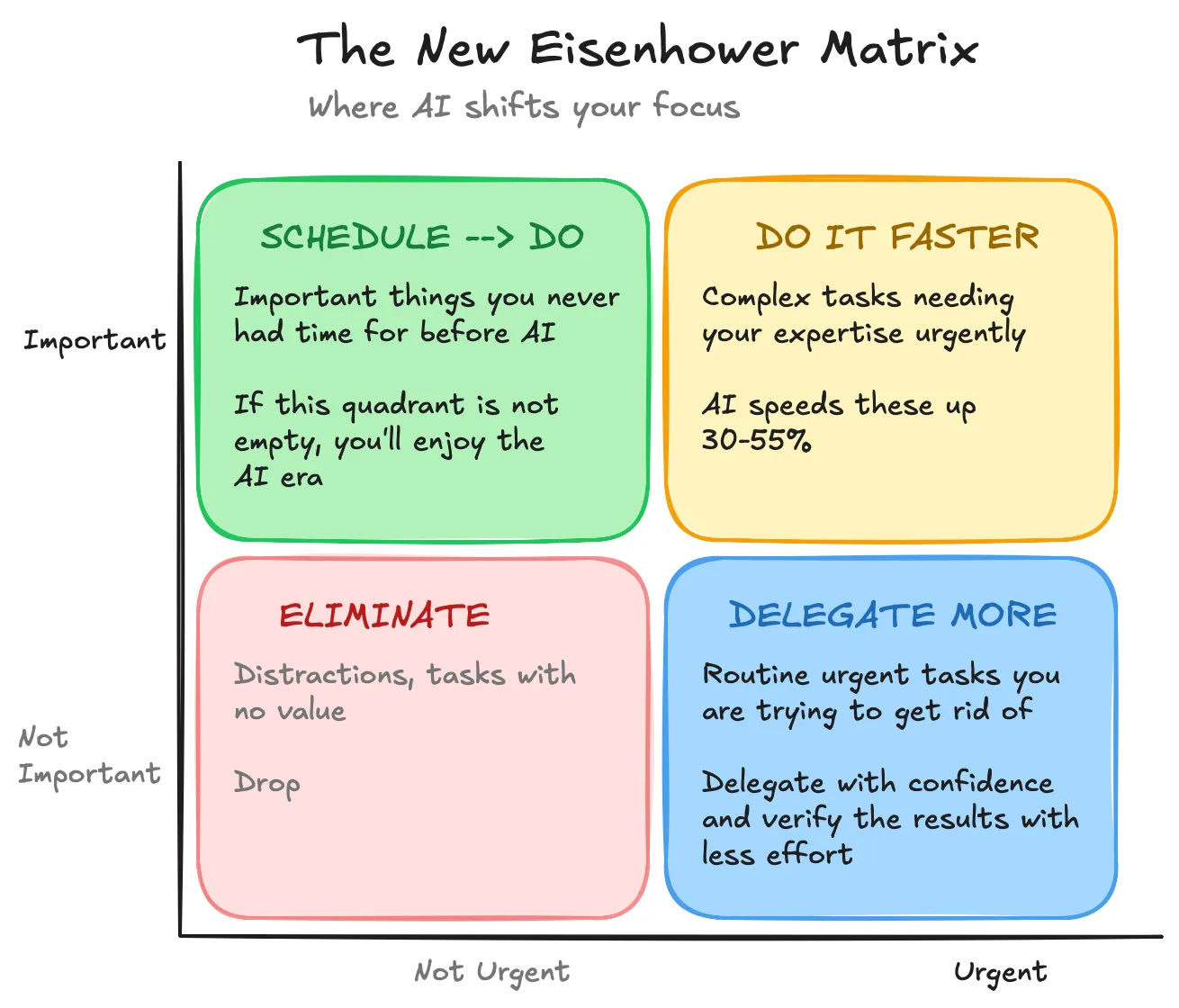
Figure 3: The AIsenhower Matrix (from the previous blog post)
Challenges in Teamwork
Communication has also become layered.
To succeed as a team, you need to adjust the usual workflow (a bit technical — feel free to skip this list):
- Trunk-based flow: developers integrate small, frequent updates into a single central branch (smaller, more frequent PRs). Reviews become easier and code conflicts less frequent, because everyone edits any given piece of code for a shorter window.
- Agent-to-agent communication:
when generating a frontend, ask your agent to leave comments on what it expects from the backend at each interaction point (e.g., “clicking this button should call POST /api/documents/verify and receive { status: ‘ok’ | ‘flagged’, issues: […] }”).Hopefully, shared agent memory across developer teams will arrive from the major AI coding providers soon . - Documentation of changes: a small AI-generated Markdown summary per PR can make reviews dramatically simpler. It should contain the reasoning behind the change, code snippets of the important parts (with links), and flags on any decisions where the coder (pair) was hesitant. In some cases it can also be shared with other agents — for example, helping the frontend agent follow up on a backend change.
- Design and feature documentation: all
features should be documented during development , not just at the end of the project, and inside the Git repository. That way the coding agents can read the current context before planning the next move.Likewise, when future directions are shared upfront, nothing gets built against them . - Peer review: instead of piling every PR on the lead engineer (which also blocks them from writing design directions and from doing the coding where their experience actually matters), shift toward peer code reviews, and …
- … more tests: because peer reviews are a little less safe, and because
AI coding can multiply (theoretical) mistakes, testing matters more than ever (unit tests, AI-driven full functional tests, and so on).
As an extra step in every project (for example, during retrospectives), the team should decide what to change in the prompt additions (CLAUDE.md, skills, etc.). The simplest way is to ask the agents themselves which corrections users added most often, and to check similar patterns in the review comments.
Organization/Department-Level Dilemmas
Introducing AI tools will, in the long run, give developers more meaningful work — but, as we saw, it also creates several challenges at the team level. From the entire
On one hand, imagine saving a significant amount of coding time even while building a solution for the first time — and,
On the other hand, you face several new risks and tasks to solve:
- Security & Data: how much of our codebase, company knowledge, and customer data can we share with AI (none) — and how do we keep the rest out?
Instead of giving the AI real data, use a structurally identical (and statistically similar) dummy table — there are tools for this (SAS Data Maker, MostlyAI, NVIDIA/gretel, SDV, Tonic), or you can generate your own synthetic data.Claude Code (and most other solutions) can be wired to AWS Bedrock models — or, if you can afford it, you can run coding on your own GPUs (which can be isolated from external networks, so you can share more freely).- Knowledge sharing is critical, but access rights still matter — and
employees need proper training on what they can and cannot share with AI tools .
- Shared Infrastructure: beyond buying GPUs and sharing their capacity across functions and tasks (to keep them working around the clock), if you allow only on-prem coder agents, there are a few areas where shortcuts simply don’t exist:
- Knowledge management: skills should be built and distributed efficiently across the company (documenting methodology, preferred coding styles, and so on for each department). The collected knowledge should be actively maintained and discussed. Prompt additions (preferences, rules, agent personas) should be shared and jointly developed — as should the list of useful MCP servers.
- Solution deployment templates: to make it effortless to deliver the same solution a second time, each one needs a “user guide” with all required inputs, customization points, and code samples. These guides must also be maintained as the underlying packages evolve.
- Internal accelerators: to keep that maintenance fast,
you may want internal toolkits used across multiple deployments that absorb the changes of the underlying packages in one place .
- Innovation and service augmentation: once the risks are under control,
make your team AI-native as early as possible so you can finish the automation phase first. After that,focus on the areas where competition will be toughest: new and innovative solutions (adding reports and features, experimenting with new algorithms to create cheaper and faster apps, etc.). The biggest trap is to focus only on the automation part. - Tool lock-in: most AI pair-coding solutions now use similar Markdown-based “prompt additions” (though the exact filenames and conventions differ — CLAUDE.md, .cursorrules, .github/copilot-instructions.md, AGENTS.md, and so on), which makes switching relatively painless today. But the knowledge-sharing platform itself should stay independent of any single solution, and the content should be translatable to several of them. The tools are improving very fast — try many of them out on different projects and share experience regularly.
- Talent allocation: some changes may be necessary depending on your current habits. Innovation now needs the most talented engineers (they can also lead the automation effort first), while projects can be executed with a slightly more junior-heavy engineer mix. In my view, the overall senior-to-junior ratio shouldn’t change — only the way you allocate them. That said, I can imagine fewer juniors entering the market over time, as
it has never been as easy to start a company as it is today .
AI-based solutions aren’t just for accelerating coding — HR, Finance, Marketing, and Sales tasks can all be automated or supported in similar ways, and a similar mindset is needed to do it right.
Conclusion
I used to believe the story of the spaceship and the bicycle was universally known — until I realized it might just be another didactic fable from my former company:
The salesperson paints a dream with the client about a spaceship (how amazing the product will be). The lead engineer then designs a car (since it’s perfectly fine for commuting on Earth). In the end, the project team delivers a bicycle, to keep within budget.
Well, for long-term survival, ship the spaceship (or at least the car), because now you actually can.
Do not forget to